IDE
Overview
ConnexCS IDE is a powerful, flexible platform that allows developers and administrators to customize, automate, and optimize the ConnexCS ecosystem.
Its a one stop solution platform for developing custom applications, automating tasks, and enhancing system efficiency. With its modular elements, it streamlines workflows while ensuring a user-friendly experience.
With an intuitive interface and a wide range of features, the IDE enables seamless integration, improved efficiency, and enhanced functionality.
Key Features
- Build Custom Buttons using the Button Builder to enhance navigation and functionality.
- Store and Manage Data with Database and Key-Value Store for persistent storage.
- Customize Interfaces via Page Builder to tailor the Control Panel, Customer Portal, and Web Phone.
- Automate Processes using ScriptForge to create and deploy scripts efficiently.
- Modify Templates for outbound emails, SMS, and WebPhone content.
- Query Databases Easily with Query Builder, simplifying database interactions without direct SQL knowledge.
Benefits
- Customization: Modify interfaces, dashboards, and reports to fit business needs.
- Automation: Reduce manual workload with ScriptForge and autonomous processes.
- Scalability: Store and manage large data volumes efficiently.
- User-Friendly: Simplify database interactions with Query Builder.
- Efficiency: Enhance workflow with custom buttons, templates, and dashboards.
Use Cases
- Various Administration Panels:
- Customize the Control Panel to meet your operational requirements.
-
Build intuitive dashboards for easy management.
-
Customer-Facing Administration Panels: Provide clients with a user-friendly interface for managing their accounts.
- Agent WebPhone & Call Center WebPhone
- Equip agents with a customizable WebPhone for seamless call handling.
- Optimize call center operations with specialized tools.
- Autonomous Calling: Enable automated outbound calls for notifications, surveys, or verifications.
- Personalizing the Dashboard: Modify dashboards to display key performance metrics and relevant data.
- Customizable Reports: Generate tailored reports to gain insights into call analytics, agent performance, and billing.
How to use the IDE?
- Login to the Control Panel.
- Click on IDE. A window will appear as follows.
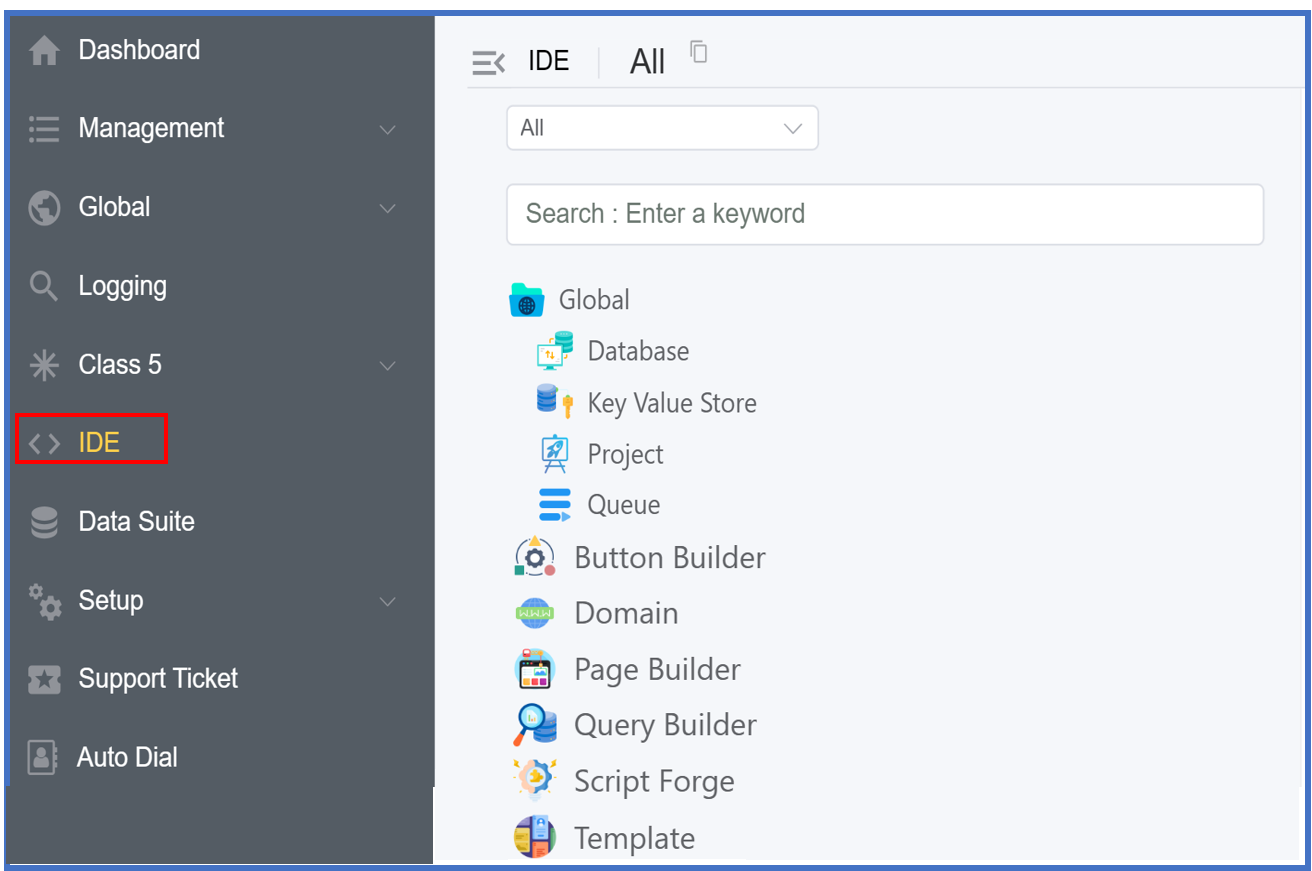
- The Global option has the following features:
Database: For creating custom data storage. Click here to know more.Key-Value Store:Key-Valuepair format for storing data. Click here to know more.Project: For organizing various applications. Click here to know more.Queue: Queue will display the status of various jobs likeWaiting,Prioritized,Active,Completed,Failed,Delayed,Paused.
- Button Builder: Create and build buttons on Control Panel, Customer Portal, Forms etc. Click here to know more.
- Domain: Create Domains where your applications will be visible. Click here to know more.
- Page Builder: Drag and Drop components to create pages, forms etc. Click here to know more.
- Query Builder: Use SQL queries to communicate with databases. Click here to know more.
- Script Forge: Create and deploy customize scripts to automate tasks. Click here to know more.
- Template: Create customize templates for outbound SMS/Calls for informing customers about balance, invoice etc. Click her to know more.