Schedule Report
Document Metadata
Category: Reporting & Analytics / Scheduled Reports
Audience: Administrators, Billing Teams, Operations Teams, Support Teams, Engineers
Difficulty: Intermediate
Time Required: Approximately 15–30 minutes
Prerequisites: Active ConnexCS account with Reports access; familiarity with Breakout reports, customers, providers, report columns, and basic reporting concepts.
Related Topics: Reports, Breakout Report
Next Steps: Navigate to Reports > Schedule Report, create a schedule using the required frequency, customers, providers, grouping, and columns, and click Save to automate recurring Breakout Report delivery.
Report Schedule Report
Overview
The Schedule Report feature allows you to automatically generate and email the Breakout Report at designated intervals.
Instead of manually generating the same report repeatedly, you can configure a schedule that specifies the report recipient, frequency, data grouping, customers, providers, and columns to include.
Scheduled reports are useful for recurring reporting requirements and ensure that the required report data is delivered automatically.
How to Schedule a Report
-
Navigate to Reports Schedule Report.
-
Click the blue
+button to create a new report schedule. -
The Schedule Report window opens.
-
Enter the required information:
-
Name: Enter a name for the report schedule.
-
Email: Specify the email address that should receive the scheduled report.
-
Frequency: Select how often the report should be generated. Available options include Daily, Weekly, and Monthly.
-
Group: Select one or more fields by which the report data should be grouped.
-
Customers: Select one or more customers. Leave this field blank to include all customers.
-
Providers: Select one or more providers. Leave this field blank to include all providers.
-
Columns: Select the columns and metrics to include in the scheduled report.
-
-
Click Save to create the schedule.
-
The created reports will be available in the list.
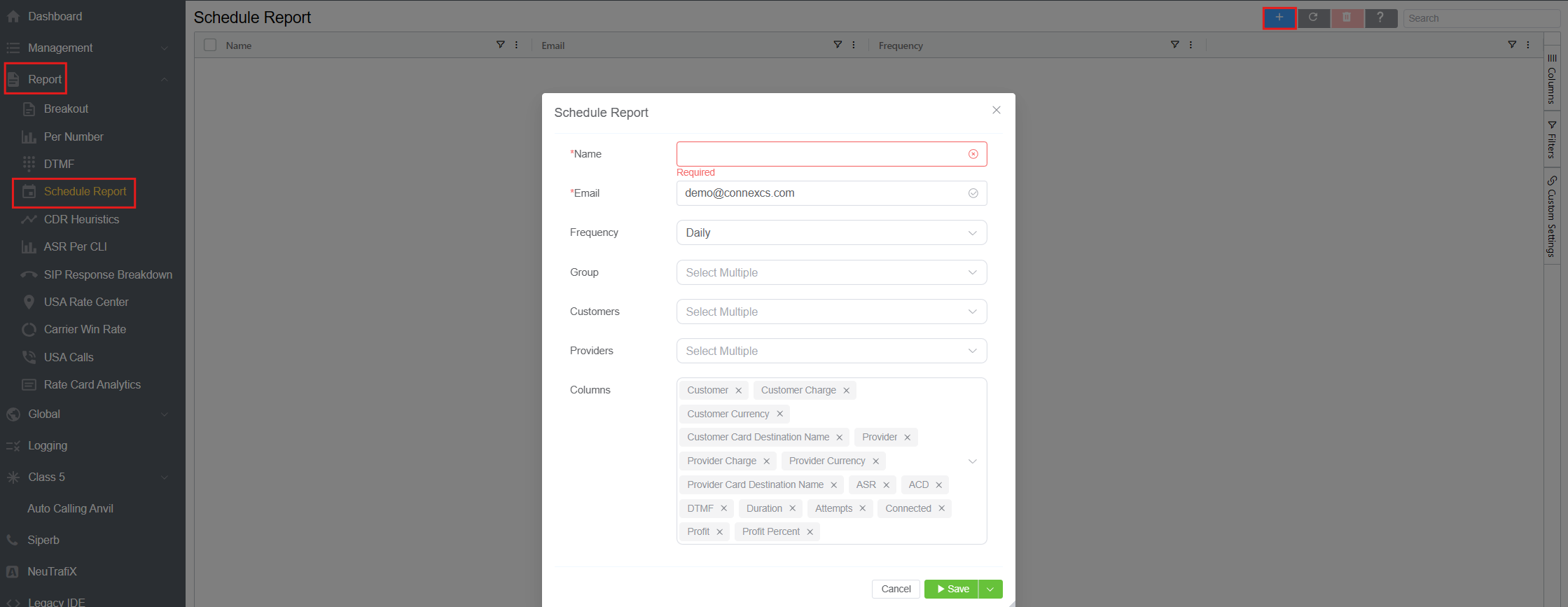
Scheduled Report
The scheduled report uses the selected configuration to generate and email the Breakout Report according to the specified frequency.
Grouping
The Group field allows you to select one or more fields to organize the report data.
Grouping determines how the data is structured in the generated Breakout Report and can be used to organize information according to the selected reporting dimensions.
Customers and Providers
The Customers and Providers fields determine which customers and providers are included in the scheduled report.
- Select one or more Customers to limit the report to specific customers.
- Select one or more Providers to limit the report to specific providers.
- Leave Customers blank to include all customers.
- Leave Providers blank to include all providers.
This allows the same scheduling functionality to be used for both specific customer/provider reporting and broader reporting requirements.
Selecting Columns
The Columns field allows you to select the information included in the scheduled Breakout Report.
Select the required fields and metrics based on the reporting requirements. The selected columns determine the data presented in the generated report.
Managing Scheduled Reports
After creating a schedule, the configured report appears in the Schedule Report list.
The list provides an overview of scheduled reports, including information such as the Name, Email, and Frequency.
Use the available report controls to manage the configured schedules.
Benefits
The Schedule Report feature helps to:
- Automate recurring Breakout Report generation.
- Deliver reports directly to specified recipients.
- Reduce the need to manually generate recurring reports.
- Maintain consistent reporting intervals.
- Customize reports by customer, provider, grouping, and columns.
- Support regular operational and billing reviews.