USA Rate Center
Document Metadata
Category: Reporting & Analytics / USA Rate Center
Audience: Administrators, Billing Teams, Operations Teams, Routing Teams, Engineers
Difficulty: Intermediate
Time Required: Approximately 15–30 minutes
Prerequisites: Active ConnexCS account with Reports access; familiarity with US telephone prefixes, rate centers, customer charges, provider charges, and call volume.
Related Topics: Reports, Breakout Report, Rate Card Management
Next Steps: Navigate to Reports > USA Rate Center, select the required date range, review rate-center activity, and use the Columns and Filters panels to refine the displayed results.
Report USA Rate Center
Overview
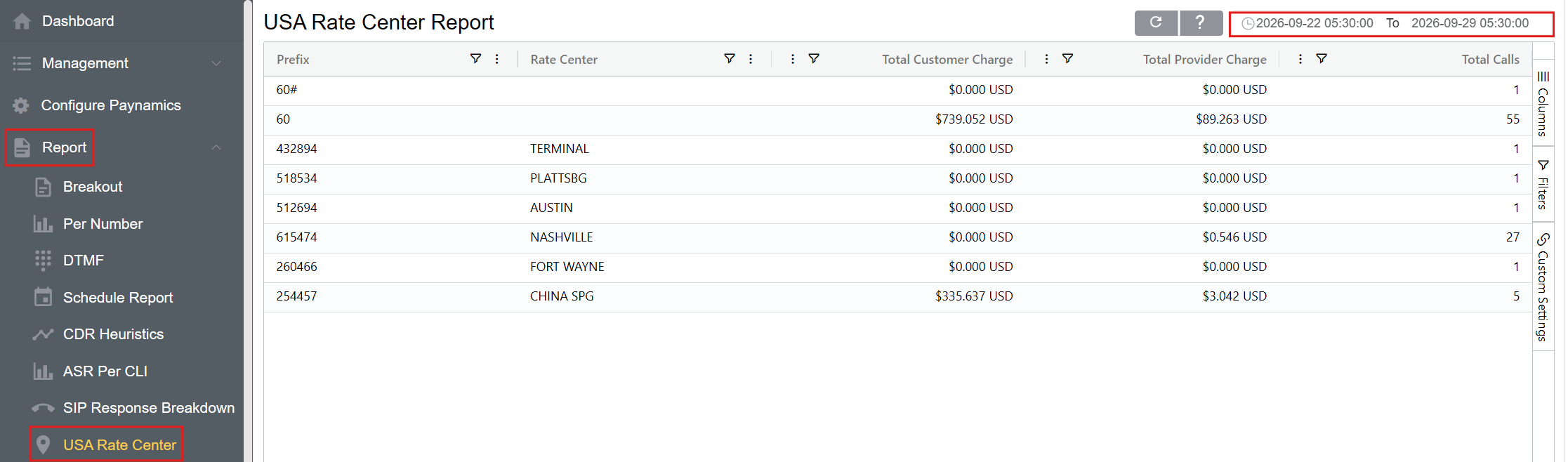
In the United States, different states and regions can have varying call rates. The USA Rate Center report provides insights into the volume of calls associated with each rate center.
A rate center represents a specific geographic region used for telecommunications billing and routing purposes.
The report provides information about the telephone Prefix, associated Rate Center, customer charges, provider charges, and call volume.
Using the USA Rate Center Report
-
Navigate to Reports USA Rate Center.
-
Select the required date and time range.
-
Click Refresh to generate the report using the selected date range.
-
Review the results by Prefix and Rate Center.
-
Review the associated Total Customer Charge, Total Provider Charge, and Total Calls.
-
Use the Columns and Filters panels to customize and refine the displayed results.
Report Columns
The Columns panel allows you to select which fields are displayed in the report.
| Column | Description |
|---|---|
| Prefix | Telephone number prefix associated with the call traffic |
| Rate Center | Geographic region associated with the telephone prefix for telecommunications billing and routing purposes |
| Total Customer Charge | Total amount charged to the customer for calls associated with the prefix and rate center |
| Total Provider Charge | Total amount charged by the provider for calls associated with the prefix and rate center |
| Total Calls | Total number of calls associated with the prefix and rate center |
Filters
The Filters panel allows you to refine the data displayed in the USA Rate Center report.
Filters can be applied to available report fields, including:
- Prefix
- Rate Center
- Total Customer Charge
- Total Provider Charge
- Total Calls
Custom Settings
The Custom Settings panel provides options for adjusting the appearance and presentation of the USA Rate Center report.
-
Theme: The Theme setting allows you to select the visual theme used for the report interface.
-
Row Height: The Row Height setting controls the vertical spacing of rows in the report grid.
-
Lower row height: Displays more rows at once.
-
Higher row height: Provides more spacing between rows for easier readability.
-
Custom settings affect the presentation of the report and do not change the underlying report data.
Refreshing the Report
Click Refresh after changing the date range or other report parameters to ensure the report reflects the current selections.
Refreshing the USA Rate Center Report
Remember to click Refresh each time parameters change to ensure you see the most recent selections onscreen. When refreshing the report, use the Report Refresh button rather than the browser refresh button.
Use Cases
The USA Rate Center report can be used to:
- Review call volume by US rate center.
- Identify prefixes associated with specific geographic regions.
- Review customer charges by rate center.
- Review provider charges by rate center.
- Compare call activity across rate centers.
- Analyze call volumes associated with specific prefixes.
- Investigate geographic differences in call activity and associated charges.
- Review customer and provider charges for a selected reporting period.