SIP Response Breakdown
Document Metadata
Category: Reporting & Analytics / SIP Response Breakdown
Audience: Administrators, Operations Teams, Support Teams, Engineers, Billing Teams
Difficulty: Intermediate
Time Required: Approximately 15–30 minutes
Prerequisites: Active ConnexCS account with Reports access; familiarity with SIP response codes, call outcomes, customers, and basic call reporting concepts.
Related Topics: Reports, Breakout Report, Per Number Report
Next Steps: Navigate to Reports > SIP Response Breakdown, select the required date range, review SIP response reasons by customer, and use the Columns and Filters panels to refine the displayed results.
Report SIP Response Breakdown
Overview
The SIP Response Breakdown report provides a breakdown of call activity based on the SIP Response Reason associated with calls.
The report organizes the results by Customer and SIP Reason, allowing you to review how many calls were associated with each response reason and the percentage that each reason represents.
This can be used to understand call outcomes and identify the SIP response reasons occurring for individual customers during a selected reporting period.
Using the SIP Response Breakdown Report
-
Navigate to Reports SIP Response Breakdown.
-
Select the required date and time range.
-
Click Refresh to generate the report using the selected date range.
-
Review the results grouped by Customer and SIP Reason.
-
Review the Total Calls and % values for each SIP response reason.
-
Use the Columns and Filters panels to customize and refine the report.
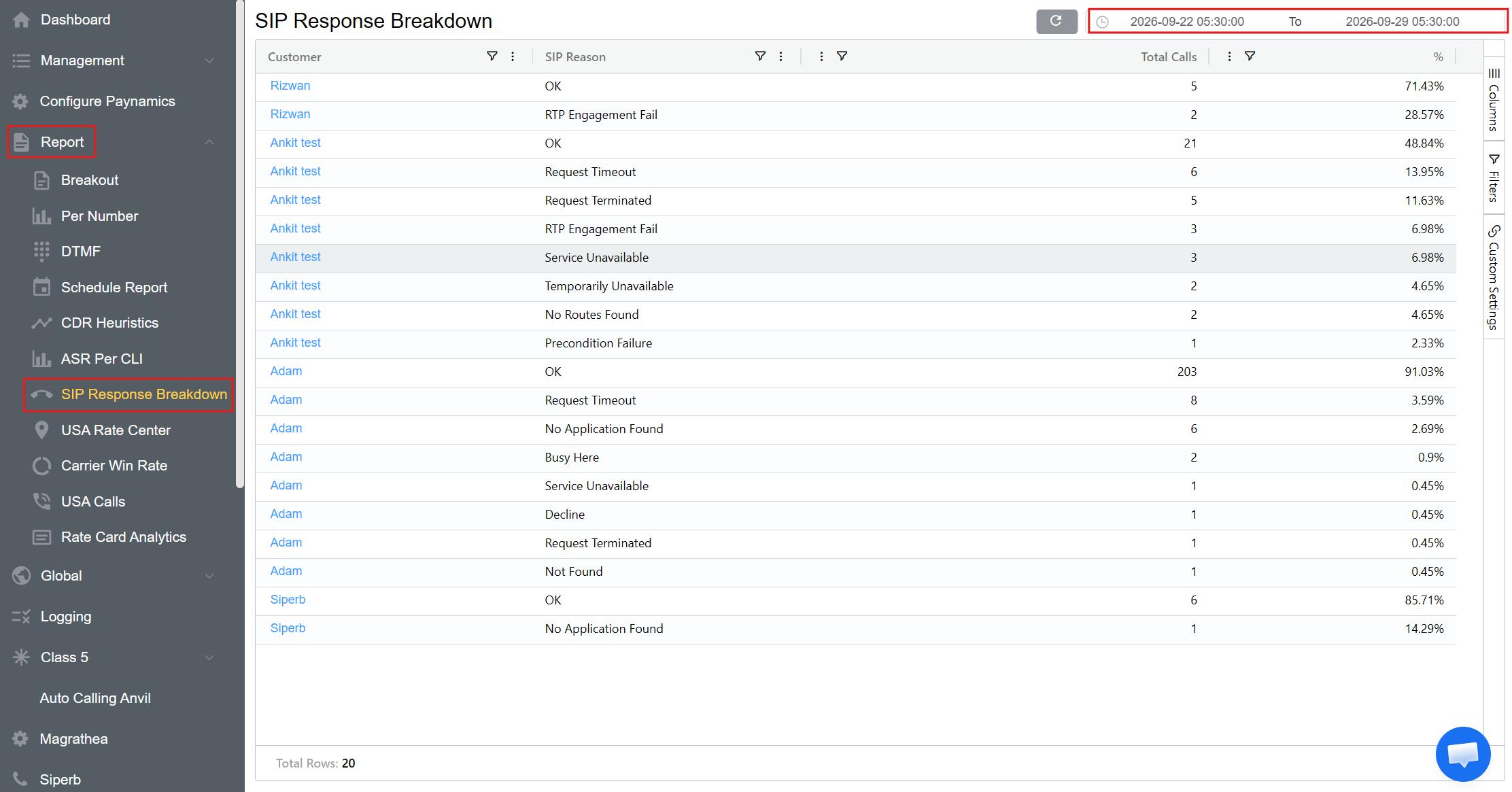
Report Columns
The Columns panel allows you to select which fields are displayed in the report.
| Column | Description |
|---|---|
| Customer | Customer associated with the calls. |
| SIP Reason | SIP response reason associated with the calls. |
| Total Calls | Total number of calls associated with the customer and SIP response reason. |
| % | Percentage of calls represented by the corresponding SIP response reason. |
SIP Reason
The SIP Reason field identifies the response reason associated with a call.
The report can display different response reasons, including examples shown in the report such as:
- OK
- Request Timeout
- Request Terminated
- RTP Engagement Fail
- Service Unavailable
- Temporarily Unavailable
- No Routes Found
- Precondition Failure
- No Application Found
- Busy Here
- Decline
- Not Found
The available response reasons depend on the call data returned for the selected reporting period.
Understanding the Results
The report presents the SIP response information by customer.
For each customer, the report displays the available SIP Reasons, together with the number and percentage of calls associated with each reason.
For example:
| Customer | SIP Reason | Total Calls | % |
|---|---|---|---|
| Customer A | OK | 203 | 91.03% |
| Customer A | Request Timeout | 8 | 3.59% |
| Customer A | No Application Found | 6 | 2.69% |
| Customer A | Busy Here | 2 | 0.90% |
This allows the distribution of call outcomes to be reviewed for each customer.
Filters
The Filters panel allows you to refine the data displayed in the SIP Response Breakdown report.
Filters can be applied to available report fields, such as:
- Customer
- SIP Reason
- Total Calls
- %
Select a field in the Filters panel and choose the required filter condition.
Custom Settings
The Custom Settings panel provides options for adjusting the appearance and presentation of the SIP Response Breakdown report.
-
Theme: The Theme setting allows you to select the visual theme used for the report interface.
-
Row Height: The Row Height setting controls the vertical spacing of rows in the report grid.
-
Lower row height: Displays more rows at once.
-
Higher row height: Provides more spacing between rows for easier readability.
-
Custom settings affect the presentation of the report and doesn't change the underlying report data.
Refreshing the Report
Click Refresh after changing the date range or other report parameters to ensure the report reflects the current selections.
Refreshing the SIP Response Breakdown Report
Remember to click Refresh each time parameters change to ensure you see the most recent selections onscreen.
When refreshing the report, use the Report Refresh button rather than the browser refresh button.
Use Cases
The SIP Response Breakdown report can be used to:
- Review SIP response reasons by customer.
- Identify the most frequently occurring SIP response reasons.
- Review the number of calls associated with individual response reasons.
- Analyze the percentage distribution of SIP response reasons.
- Investigate customer-specific call outcomes.
- Identify response reasons that may require further investigation.
- Compare SIP response distributions across customers.
- Review call activity for a selected date and time range.