USA Calls
Document Metadata
Category: Reporting & Analytics / USA Calls
Audience: Administrators, Billing Teams, Operations Teams, Routing Teams, Engineers
Difficulty: Intermediate
Time Required: Approximately 15–30 minutes
Prerequisites: Active ConnexCS account with Reports access; familiarity with U.S. call classification, Intrastate and Interstate traffic, customer/provider billing, and call duration metrics.
Related Topics: Reports, Breakout Report, Rate Cards
Next Steps: Navigate to Reports > USA Calls, select the report type, customers, providers, and date range, then review call counts, connected calls, durations, and billing information.
Report USA Calls
Overview
The USA Calls report provides a breakdown of U.S. call traffic based on how calls are classified geographically.
The report separates traffic into categories such as:
- Intrastate (On-net) Calls: Calls where the origin and destination are within the same U.S. state.
- Interstate (Off-net) Calls: Calls between different U.S. states.
- Indeterminate Calls: Calls where the system cannot definitively determine whether the traffic is Intrastate or Interstate.
The report provides call counts, connected calls, call duration, and billing-related information. This helps carriers and customers analyze U.S. traffic usage for billing, compliance, traffic analysis, and routing decisions.
The USA Calls report can be viewed using either State or LATA classification.
Using the USA Calls Report
To generate the report:
- Navigate to Report USA Calls.
-
Select the report Type:
- State
- LATA
-
Select the required Customers from the customer selector.
-
Select the required Providers from the provider selector.
-
Use the date selector to specify the reporting period.
-
Review the call counts, connected calls, durations, and billing information in the report.
-
Use the Columns, Filters, and Custom Settings panels to adjust the report presentation.
Report Type
The Type selector determines how U.S. calls are classified.
| Type | Description |
|---|---|
| State | Calls are classified based on the U.S. state associated with the call origin and destination. |
| LATA | Calls are classified based on Local Access and Transport Area (LATA) boundaries. |
Customer and Provider Selection
Use the selectors at the top of the report to limit the results to specific:
- Customers
- Providers
Leaving a selector unrestricted allows the report to include the applicable available traffic for that dimension.
Date Range
Use the date selector to define the period for which the USA Calls report should be generated.
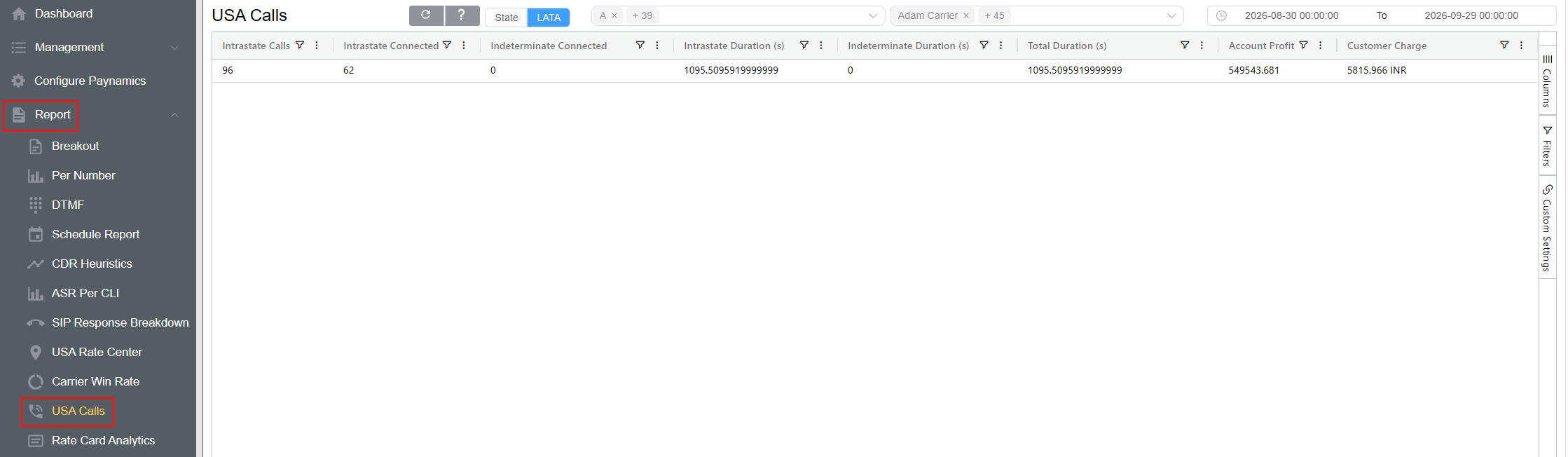
The screenshot shows the report being generated for:
2026-08-30 00:00:00 to 2026-09-29 00:00:00
Report Columns
The USA Calls report provides call classification, connection, duration, and billing metrics.
| Column | Description |
|---|---|
| Intrastate Calls | Total number of calls classified as Intrastate, where the origin and destination are within the same U.S. state |
| Interstate Calls | Total number of calls classified as Interstate, where the origin and destination are in different U.S. states |
| Indeterminate Calls | Total number of calls that can't be definitively classified as Intrastate or Interstate |
| Intrastate Connected | Number of successfully connected Intrastate calls |
| Interstate Connected | Number of successfully connected Interstate calls |
| Indeterminate Connected | Number of successfully connected calls where the geographic classification is indeterminate |
| Intrastate Duration (s) | Total duration of connected Intrastate calls, measured in seconds |
| Interstate Duration (s) | Total duration of connected Interstate calls, measured in seconds |
| Indeterminate Duration (s) | Total duration of connected calls with an indeterminate classification, measured in seconds |
| Total Duration (s) | Combined duration of the applicable call traffic, measured in seconds |
| Account Profit | Profit associated with the reported traffic |
| Customer Charge | Amount charged to the customer for the reported traffic |
The exact columns displayed can depend on the report configuration and selected columns. The screenshot shows Intrastate Calls, Intrastate Connected, Indeterminate Connected, Intrastate Duration (s), Indeterminate Duration (s), Total Duration (s), Account Profit, and Customer Charge.
Understanding Call Classification
Intrastate
An Intrastate call originates and terminates within the same U.S. state.
For example, a call originating in one location in California and terminating at another location in California is classified as Intrastate when the system can determine both locations.
Interstate
An Interstate call originates in one U.S. state and terminates in another U.S. state.
For example, a call originating in California and terminating in Texas is classified as Interstate.
Indeterminate
An Indeterminate call is one for which the system cannot definitively establish the applicable geographic classification.
This can occur when the location information required for classification is missing or ambiguous.
Filters
Use the Filters panel to refine the data displayed in the USA Calls report.
Available filter conditions include:
| Condition | Description |
|---|---|
| Equals | Shows records matching the specified value. |
| Does not equal | Excludes records matching the specified value. |
| Less than | Shows values below the specified value. |
| Less than or equal to | Shows values at or below the specified value. |
| Greater than | Shows values above the specified value. |
| Greater than or equal to | Shows values at or above the specified value. |
| Between | Shows values within the specified range. |
Filters can be useful when investigating particular call classifications, connection counts, duration values, or billing metrics.
Custom Settings
The Custom Settings panel allows you to adjust how the report is displayed.
-
Theme: Select the available display theme for the report.
-
Row Height: Adjust the height of rows displayed in the report:
-
Lower row height — displays more records within the available screen space.
- Higher row height — provides more spacing between rows for easier reading.
Reviewing Billing Information
The report can also be used to review financial information associated with the reported U.S. traffic.
Account Profit
Account Profit represents the profit associated with the reported traffic.
Customer Charge
Customer Charge shows the amount charged to the customer for the applicable traffic.
These fields can be reviewed alongside call volume and duration to understand traffic usage and associated billing.
Refreshing the Report
After changing the report parameters, use the Refresh button at the top of the report to load the updated results.
Use the report's Refresh button after changing the date range, customers, providers, or other report parameters. You don't need to refresh the entire browser page.
Use Cases
The USA Calls report can be used to:
- Analyze Intrastate and Interstate call volumes.
- Review calls that have been classified as Indeterminate.
- Compare connected calls across different U.S. traffic classifications.
- Analyze call duration by classification.
- Review customer charges associated with U.S. traffic.
- Review account profitability for the selected traffic.
- Support U.S. traffic billing and classification analysis.
- Analyze traffic using either State or LATA boundaries.
- Support routing and operational analysis of U.S. call traffic.